

The latest updates to Google Chrome introduce a robust security feature aimed at enhancing the protection of your home network against potential hackers. This feature requires websites to request permission before accessing devices on your network, giving users the option to grant or block access by default.
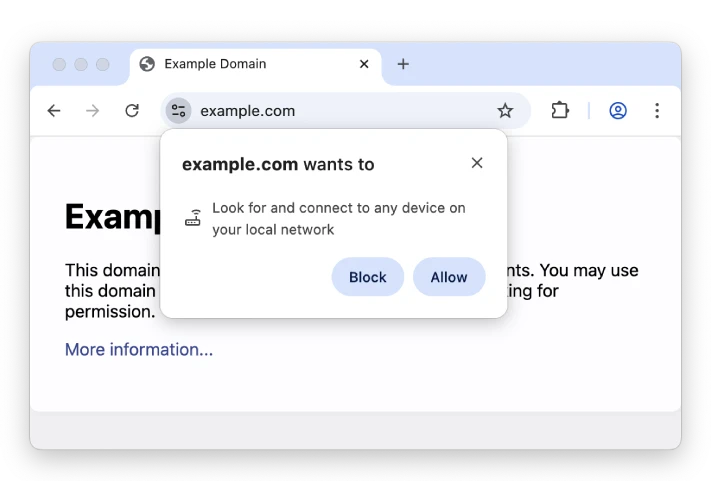
While there are legitimate reasons for certain local-network requests – such as casting videos to your smart TV or backing up files to a NAS drive -Google states that the new permission “mitigates the risk of cross-site request forgery attacks” against your router and other devices.
This new setting represents a significant step in protecting your network devices. Additionally, this setting helps prevent fingerprinting, further enhancing your network’s security.
ALSO READ: How to Disable Website Notifications in Chrome on Android
How to Stop Websites Accessing Your Home Network
1. Open Chrome and go to chrome://settings/content/localNetworkAccess.
2. By default, sites can request access to devices on your local network.
3. When a site prompts, choose Allow or Block.
4. To stop all such prompts, select Don’t allow sites to connect to any device on your local network.
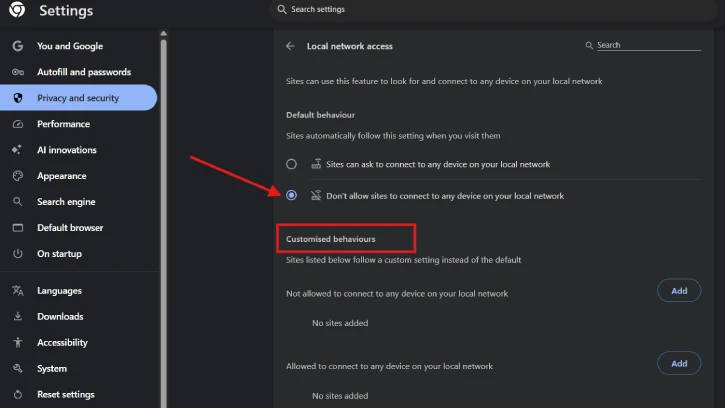
You can also enable or disable specific sites from accessing your home or office network. On the same settings page, under the “Customized behaviors” option, you can add websites to either allow them to connect to any device on your local network or block them from connecting to any device on your local network.
Conclusion
Local Network Access (LNA) in Google Chrome and Microsoft Edge browsers enhances security by requiring websites to request permission before accessing devices on your local network—such as printers, routers, and local servers. This prompts you to allow or block connections, reducing the risk of unauthorized access or data exposure from malicious sites and helping protect devices and sensitive information on your home or office network.

