

Studying for an exam with less than 24 hours left can indeed be stressful, with textbooks, scattered notes, and hours of lecture videos creating chaos. Instead of resorting to caffeine and frustration, consider using NotebookLM—an AI-powered study companion that transforms your course materials into concise, useful study aids quickly.
In this guide, we will learn how to use Google’s NotebookLM for last-minute exam preparation. This tool is simple and easy to use, requiring no technical skills. It’s designed for students at all levels and supports several regional languages.
What is NotebookLM and Why it Works for Exam Prep
NotebookLM is a document‑focused AI notebook from Google that answers questions using only the files and links you provide. Upload your class notes, PDFs, slides, or add YouTube lecture links and NotebookLM will summarize, highlight key points, and generate study materials based strictly on your course content. That focus reduces mistakes from unrelated web sources and keeps everything aligned with what your instructor actually covered.
Key strengths:
- Uses only your uploaded sources (you can also let it search for extra sources if needed).
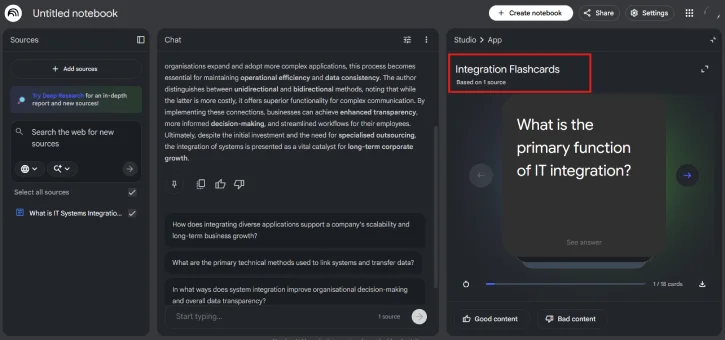
- Supports multiple learning styles: text summaries, videos, audio overviews (podcast style), flashcards, quizzes, and slide-style presentations.
- Fast generation for most features; video/audio may take longer (5–15+ minutes depending on input).
How to Use NotebookLM for Exam Prep (Step-by-Step)
1. Go to NotebookLM website and log in with your Google account (Gmail).
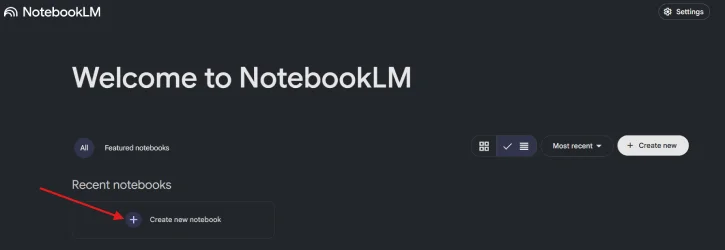
2. Click “Create New Notebook” button.
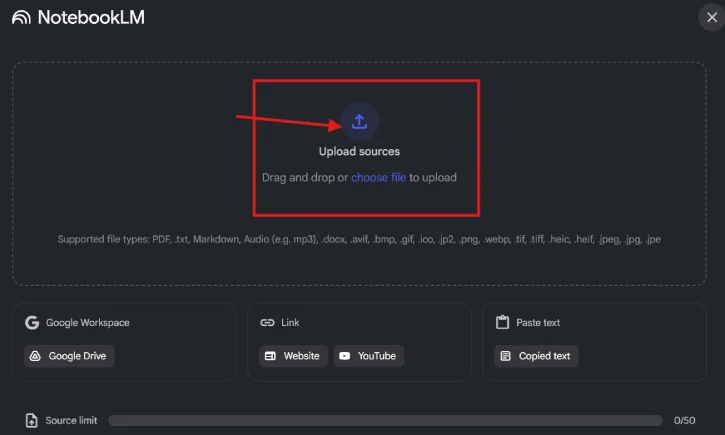
3. Upload PDFs, notes, slides, or paste YouTube lecture links (or ask NotebookLM to find sources).
4. Use the chat box to ask targeted questions — NotebookLM will answer using only your uploaded material and provide links to source pages.
5. Toggle features like Video, Audio Overview, Flashcards, or Quizzes to generate different study formats.
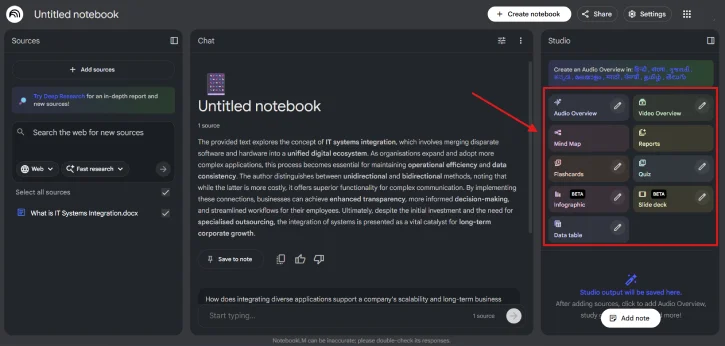
6. Choose content length (short or detailed) and style; you can also tell the AI to focus on a specific chapter or topic.
Note: audio and video generation can take longer than flashcards/quizzes.
ALSO READ: How to Create Storybooks with illustrations & Audio Using Gemini
How to Use it Effectively for Last‑Minute Studying
1. Prioritize: upload only the most relevant chapters, lecture slides, or recordings for the topics likely to appear on the exam.
2. Ask focused questions: “Summarize Chapter 6 in 6 bullet points,” or “List formulas and when to use them.”
3. Use Audio Overview for passive review while doing other tasks (commute, chores).
4. Generate flashcards and run quick quiz sessions to reinforce recall.
5. Create a short presentation or cheat‑sheet of key formulas, dates, or definitions for final review.
Best Features for Cramming
- Audio Overview (podcast style) — great for listening and reinforcing while resting.
- Flashcards & Quizzes — rapid active recall practice.
- Condensed summaries — turn long chapters into bite‑sized review notes.
- Video generation — quick visual walkthroughs of complex procedures or proofs.
Practical Last‑Hour Plan (example)
1. Upload the most critical chapters/slides (30 min).
2. Generate a 1‑page summary and a list of key formulas/concepts (10–15 min).
3. Produce flashcards and run two 10‑minute quiz rounds (20 min).
4. Listen to the Audio Overview while doing a quick review of the summary (20–30 min).
5. Skim any flagged source pages for details you still feel shaky about (remaining time).
Final Tips
- Be selective with uploads to save time and focus on high‑yield material.
- Use the AI outputs as study tools — don’t rely on them to replace understanding.
- Re-run summaries or quizzes with different prompts if you need a different level of detail.
Conclusion
NotebookLM isn’t magic, but used strategically it’s one of the fastest ways to turn scattered notes and long lectures into an organized, exam‑ready study session. Upload your materials, pick the right formats (audio for passive review, quizzes for recall), and use short focused sessions to maximize retention. Good luck on the exam.

