
 Posted by
 Google Producer AI is now available through Google Labs, offering creators a powerful way to generate original music using artificial intelligence. Unlike other AI music generators with restrictive free tiers, Producer AI combines multiple Google models—including Lyria 3 for music composition, Gemini for intelligent chat assistance, Veo for music video creation, and Nano Banana for album artwork—into one integrated platform.
This guide walks you through generating your first AI-powered song, completely free.
Table of Contents
Understanding Producer AI’s Free Tier
The free version of Producer AI includes 2 concurrent music generators, allowing you to create multiple songs simultaneously. However, it’s important to understand the limitations:
- Personal use only: Generated songs cannot be used commercially on platforms like YouTube or Spotify
- AI watermarking: Every song receives a Google-assigned systematic ID, making its AI-generated origin transparent
- No commercial licensing: Current terms restrict monetization of free-tier creations
Note: Google’s terms of service change periodically, so always review the latest licensing agreements before using generated music for any commercial purpose.
Step-by-Step Guide: Creating Music with Producer AI
Step 1: Access Producer AI and Sign In
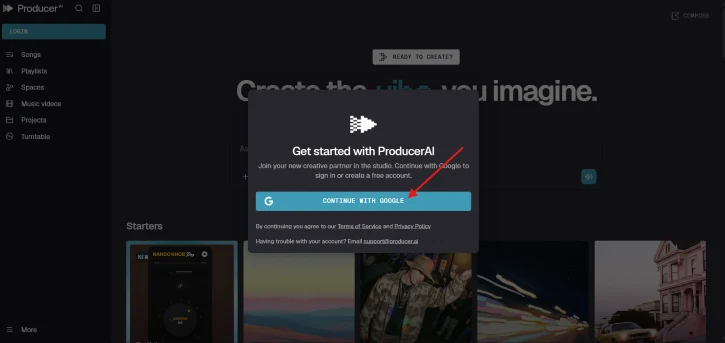
Navigate to Producer.ai and locate the login button in the sidebar. Sign in using your Google account. You’ll be redirected to the Producer AI home screen, where you’ll find a prompt box ready for input.
Step 2: Craft Your Music Prompt
The quality of your generated music depends heavily on your prompt. If you’re unfamiliar with music terminology, use Google Gemini or ChatGPT to help generate an optimized prompt based on your preferences.
For example, if you do not know anything about music terminology, but want to know how Producer AI generate song, you could just ask to Gemini or ChatGPT: “Generate a prompt to create music in Producer.ai. The song language is Hindi.”
Or use this detailed example for a Hindi romantic ballad:
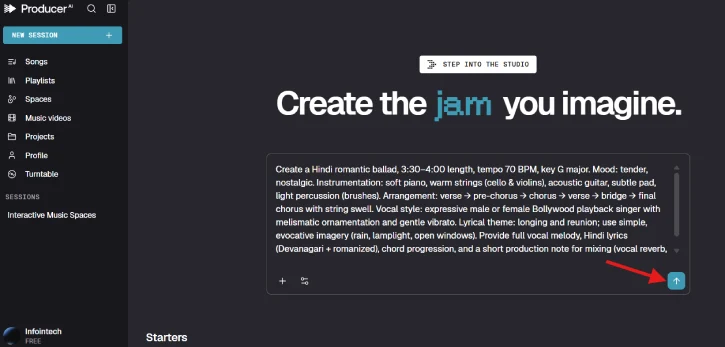
"Create a Hindi romantic ballad, 3:30–4:00 length, tempo 70 BPM, key G major. Mood: tender, nostalgic. Instrumentation: soft piano, warm strings (cello & violins), acoustic guitar, subtle pad, light percussion (brushes). Arrangement: verse → pre-chorus → chorus → verse → bridge → final chorus with string swell. Vocal style: expressive male or female Bollywood playback singer with melismatic ornamentation and gentle vibrato. Lyrical theme: longing and reunion; use simple, evocative imagery (rain, lamplight, open windows). Provide full vocal melody, Hindi lyrics (Devanagari + romanized), chord progression, and a short production note for mixing (vocal reverb, warm tape saturation)."Step 3: Enter Your Prompt and Generate
Copy your optimized prompt and paste it into the prompt box on Producer AI. Press Enter to begin the generation process. You’ll see a progress indicator as the AI composes your music.
Step 4: Preview Your Generated Music
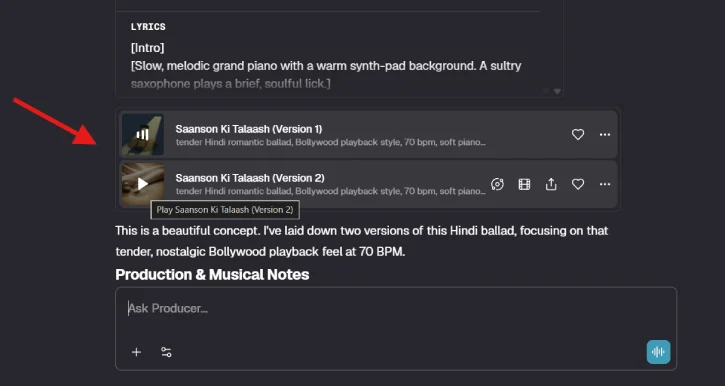
Once generation completes, tap the play button to listen to your track. This is your chance to evaluate whether the output matches your vision before downloading.
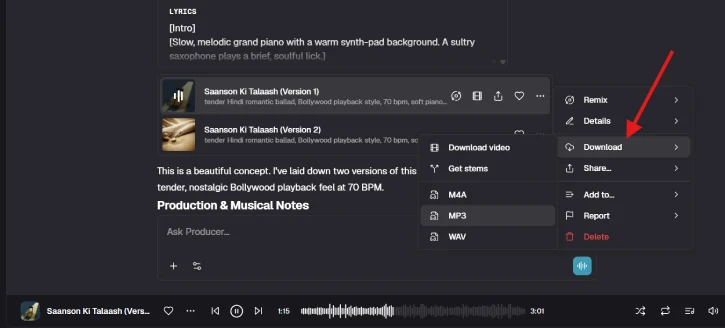
Step 5: Download Your Music
To download your generated song:
- Tap the three-dot horizontal menu above the download button
- Select your preferred format: M4A, MP3, or WAV
- For video versions, use the dedicated download video button
Step 6: Remix and Customize (Optional)
If the initial output doesn’t meet your expectations, refine it:
- Tap the 3-dot menu again
- Select Remix
- Tap Start Session to open the compose interface
- Adjust lyrics, sound, and dynamics as needed
- Tap Generate to create a new version
ALSO READ: How to Know if a Video is AI-Generated or Real Using Gemini, Hive & Physical Inspection
Key Advantages of Producer AI
Integrated ecosystem: Unlike standalone music generators, Producer AI connects with Gemini for prompt optimization, Veo for music video creation, and Nano Banana for album artwork—streamlining your entire creative workflow.
Multilingual support: Create music in any language, from Hindi and Spanish to Mandarin and beyond.
Multiple format options: Download in M4A, MP3, WAV, or video formats, giving you flexibility for different use cases.
Mobile accessibility: The platform works seamlessly on smartphones, allowing you to create music anywhere.
Important Limitations and Considerations
Free tier restrictions: The 2-concurrent-generator limit may feel restrictive for prolific creators. Paid plans offer higher limits, though pricing details should be reviewed on the platform.
Commercial use prohibited: Free-tier music cannot be monetized or published on streaming platforms. If you need commercial licensing, you’ll need to explore paid options or contact Google directly.
AI transparency: Every song carries a systematic Google ID, ensuring listeners know it’s AI-generated. This transparency is beneficial for ethical reasons but may affect certain creative applications.
ALSO READ: How to Make Perfect Prompt for Gemini Nano Banana
Tips for Better Music Generation
1. Be specific with instrumentation: Rather than saying “orchestral,” specify “soft piano, warm strings (cello & violins), and light percussion.”
2. Define mood and tempo: Include BPM, key, and emotional descriptors (e.g., “tender, nostalgic”) to guide the AI’s composition.
3. Use AI assistants for prompts: If music terminology isn’t your strength, leverage Gemini or ChatGPT to translate your creative vision into technical language.
4. Experiment with remixing: Don’t settle for the first output. Use the remix feature to iterate and refine until you’re satisfied.
Final Thoughts
Google Producer AI democratizes music creation, making professional-quality compositions accessible to anyone with a Google account. While the free tier comes with important restrictions, it’s an excellent starting point for experimentation, personal projects, and learning how AI can enhance creative workflows.
As Google continues developing this tool, expect expanded free-tier limits and potentially deeper integration with other Google services. For now, the free version offers genuine value—especially for creators working in non-English languages who often find limited options in the AI music space.
Start creating today, and explore the possibilities of AI-assisted music generation.