

AI dance videos have gone viral on platforms like Instagram and Facebook. These short clips animate a single photo into a realistic dancing character, and anyone can make them—no choreography, recording, or advanced prompts required. This guide shows how to create a shareable AI dance video for free using Kling AI.
If you’re unsure about making viral AI dance videos, this guide is here to help. It provides a step-by-step method to create an AI dance video using your photos, all at no cost to you. Once you create your video, you can share with your friends and family.
What is Kling AI and How to Use it
Kling AI is an advanced tool for Android devices that transforms a single photo into a realistic dancing video using AI-driven motion synthesis. Users select a dance style and prompt, and the system generates smooth body movement without recording, choreography, or professional software—fast and user-friendly.
Using Kling AI, you upload one image, pick a dance style, and the AI automatically produces an entertaining dance clip. No manual video recording or dance skills are required. The process is quick, accessible, and popular on Instagram among influencers and everyday users.
How to Create a Free AI Dance Video with Kling AI
Turn a single photo into a fun dance clip in minutes using Kling AI. Follow this straightforward step-by-step guide to get a clean, feed-ready video—no advanced skills required.
What you’ll need
- A full-body photo (head-to-toe visible). For best results use a vertical 16:9 image.
- The Kling AI app (free on Google Play).
- Optional: a generated cartoon/miniature character image if you want a stylized result.
Make a 3D cartoon character (optional)
If you prefer a cute 3D kid / cartoon avatar, generate an image first using Gemini or ChatGPT with a prompt like:
Use uploaded image for face and convert this image into a 3D cute cartoon style. Make the photo feel like a 3D child, full body up to the feet visible, vertical 16:9 format, realistic background (you may blur the background for a polished look).
Step-by-step: Create the dance video
1. Choose or generate a full-body image (16:9 vertical recommended).
2. Install Kling AI from the Play Store on your Android phone.
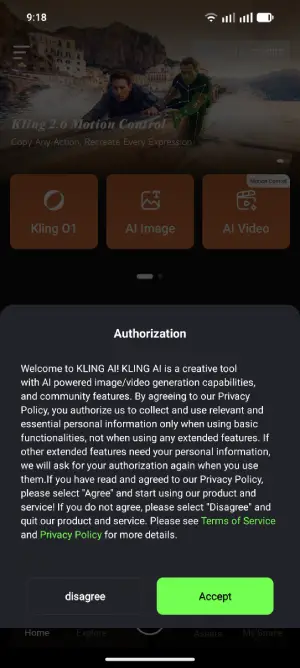
3. Open Kling AI, grant the requested permissions, and sign in with your preferred method.
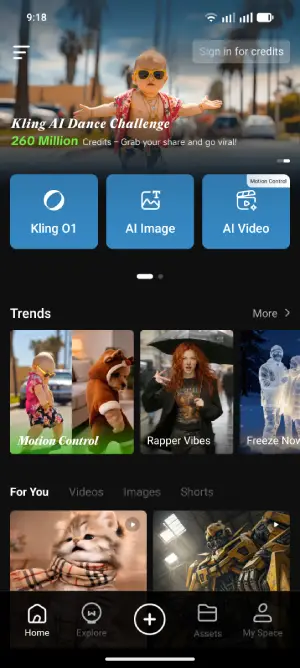
4. From the home screen you’ll see many videos and templates. To recreate a clip from the feed, tap the video and choose “Regenerate.” For a custom video, go to the “Trending” section.
5. Browse the available video styles; tap any preview to see the full animation. When you find a style you like, upload your image (or tap to select one already on your device).
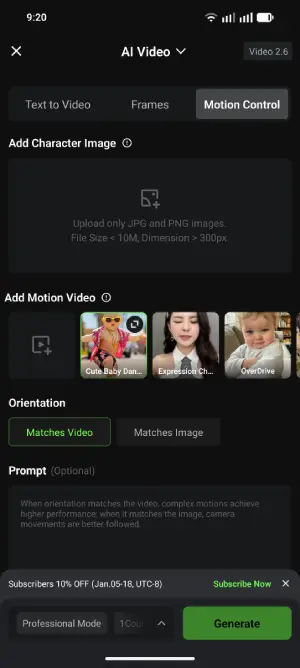
6. Tap “Generate.” Kling AI will process your image into the selected dance animation. Processing time varies—sometimes minutes, sometimes longer. If it’s queued, you can exit the app and return later to view the result.
Tips for best results
- Use a clear, full-body image with minimal obstructions.
- Vertical 16:9 framing blends best in social feeds.
- Slightly blur or simplify busy backgrounds to keep focus on the subject.
- If a specific dance moves or style is available in the feed, download that clip and upload it to Kling AI to more closely replicate the motion.
- That’s all—upload, pick a style, generate, and enjoy your new AI dance video.
Conclusion
AI dance videos turn ordinary photos into eye-catching, shareable clips with almost no effort. They let anyone create polished, entertaining content without dancing, recording, or advanced editing—making them perfect for Instagram trends and quick engagement boosts. Because they’re distinctive, fast, and easy (often free to try), both casual users and creators can use AI dance videos to get more views, likes, and shares or to make artistic content from personal photos.

