

AI chatbots, such as ChatGPT, Gemini, Copilot, Meta AI, Claude, and others, have gained significant popularity, with many people utilizing these services for various tasks. However, a notable concern is that conversations with AI bots are typically not anonymous. Many chatbots require an email address for sign-up and collect user information and chat history to enhance the model and improve accuracy.
Now, there is a way to ensure your chats remain completely anonymous when using popular chatbots like ChatGPT, Meta AI, Claude, and Mistral. No sign-up is required, and your personal information will not be shared. Additionally, the content of your chats will not be used to train or improve any models. Here is how to do it.
Table of Contents
How to Use Popular AI Chatbots Without Signup and Anonymously?
DuckDuckGo, the privacy-focused search engine and web browser, has added a new ‘AI Chat’ feature to its service. This feature allows users to use popular chatbots anonymously, without the need for signing up. The ‘AI Chat’ can be accessed from any browser on your computer or smartphone, and you don’t necessarily have to install the DuckDuckGo browser to use it.
1. Go to DuckDuckGo website or install and launch DuckDuckGo browser.
2. Next, click the Hamburger menu at the right and choose “AI Chat”.
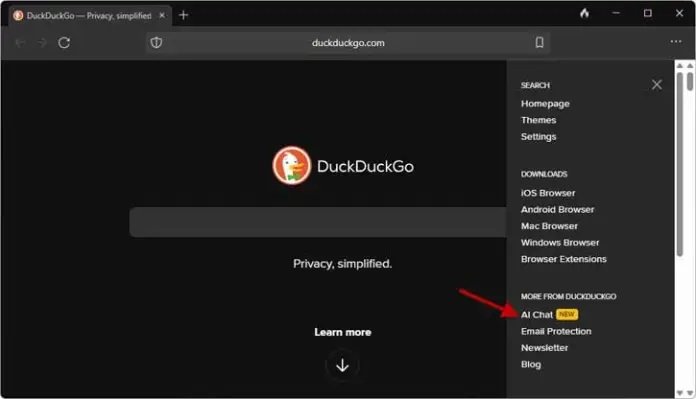
3. Click the “Get Started” button and select a Chatbot from the list. Currently available models are ChatGPT, Meta AI (Llama), Claude and Mixtral.
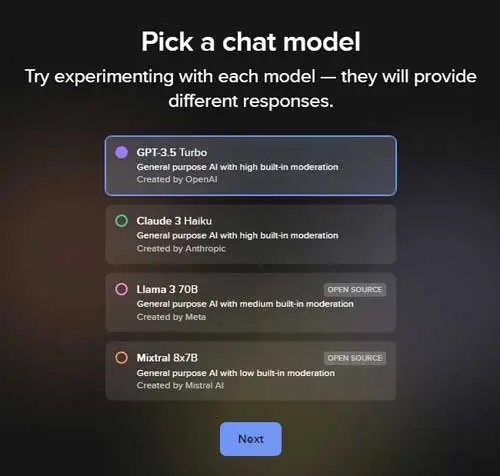
4. Next, click “Next” and accept the terms and conditions and start using the model.
5. Now, to select another AI model, click the “Change default model” icon on the left of the chat page and select a model.
6. To remove your conversation, click the fire icon.
How Does DuckDuckGo’s AI Chat Protect Your Data?
DuckDuckGo’s Chat AI doesn’t require users to sign up or provide any personal information. This means your chats are not tied to your identity, ensuring complete anonymity.
The Chat AI doesn’t collect any metadata that could identify your device, like your IP address. This prevents your chats from being associated with your device or location.
DuckDuckGo has committed to not sharing users’ chats with any third parties, including the model providers. It uses its own IP address to connect with the bot. Your conversations will remain private and won’t be used for other purposes.
DuckDuckGo only stores chats briefly to ensure their systems are working properly. But since the chats are already anonymous, there’s no need to further anonymize them.
By implementing these privacy-focused measures, DuckDuckGo’s Chat AI aims to provide a secure and confidential conversational experience that truly respects user data and privacy.

