

Vibration on your smartphone helps you get discreet notifications for calls, messages, etc. It will also enhace user interaction through haptic feedback, improved accessibility for those with hearing impairments, and adds immersion in gaming experiences.
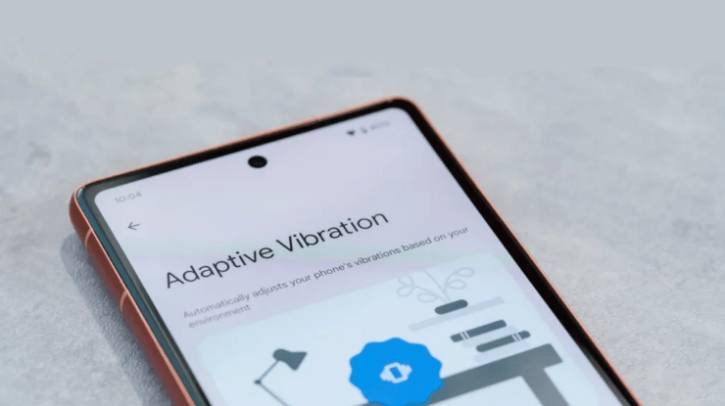
Like the advantages, vibration feature has also some downsides. When your phone vibrates for notifications, calls, or messages, the sound can be quite loud. This can be a problem if you’re in places like a college, library, or workplace, as it might disturb those around you.
The Adaptive Vibration feature, available with the Android 15, solve this issue by automatically adjusting the intensity of the vibration based on your surrounding noise. The vibration intensity will be lower when you are in a quiet environment and will be set to maximum when you are in a louder, noisier place.
Adaptive Vibration isn’t enabled by default, so you need to enable it manually. In this guide, let us know how to turn on Adaptive Vibration on your phone running Android 15 or later. Note that the feature is available with Google Pixel 7 or a newer Pixel device.
Steps to Enable Adaptive Vibration on Pixel Phone
- Open the Settings app on your Google Pixel phone.
- Next, select the “Sound and Vibration” option and tap on “Vibration and Haptics.”
- Tap the toggle next to “Adaptive Vibration” to turn on the feature.
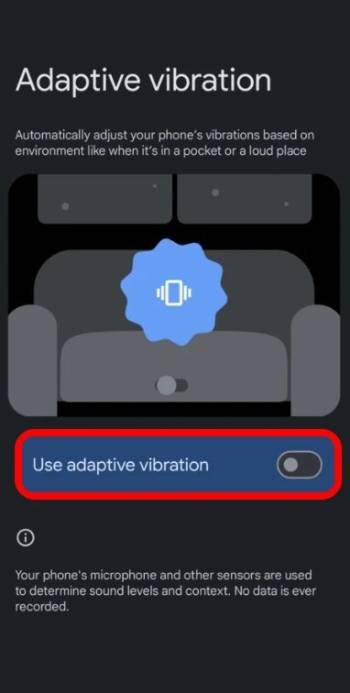
Note: This feature is not available on non-Pixel devices running Android 15. However, you can still manage the vibration intensity by selecting low, medium, or high intensity. Here is how to do it.
ALSO READ: Control App Notifications and Calls While Driving on Android Auto
How to Change Vibration Intensity on Other Android Phones
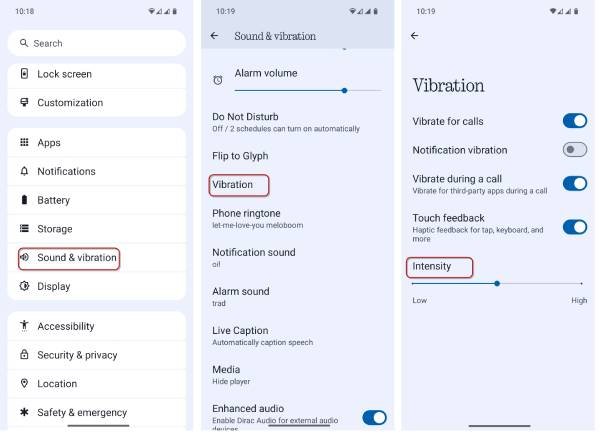
- Open the Settings app and select the Sound and Vibration option.
- Then, choose Vibration Settings.
- In the Intensity tab, adjust the slider to set your preferred level: Low, Medium, or High.
That is all how to enable the Adaptive Vibration feature on your Android device. Keep in mind that the name of this feature may vary depending on your phone manufacturer’s operating system, but it serves the same purpose.

