

Google Gemini recently introduced a new feature called Storybooks, making storytelling fun and interactive. You can start creating your own AI storybook for your kids with illustrations and audio with just one simple prompt, and it is free!

With Storybooks, Gemini allows users to create personalized storybooks on any topic. This feature is designed especially for families with young children, enhancing their storytelling experiences together.
The Storybooks come with illustrations and read-aloud narration, making it easy for kids to enjoy the stories. Parents can engage their children in creative ways through this feature.
Best of all, the Storybooks feature is available to everyone, even those with free Google accounts. Here is how to create a storybook using Gemini AI assistant.
How to Create Storybooks with Audio Using Gemini
You can tell any story you think of, and the Gemini AI will create a special 10-page book with its own pictures and sounds.
1. First, go to gemini.google.com and log in with your Google account.
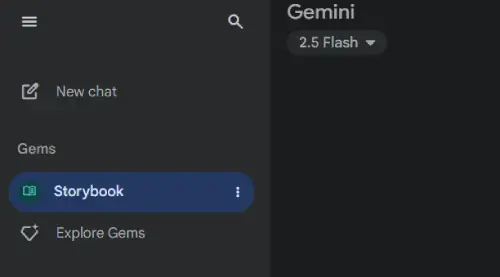
2. Select “Storybook” option from the left sidebar under “Gem.”
3. Now, enter a text prompt. For example, “Using a Claymation art style, create a storybook about friendly bees and how useful they really are to the earth, to help my kids lose their fear of them.”
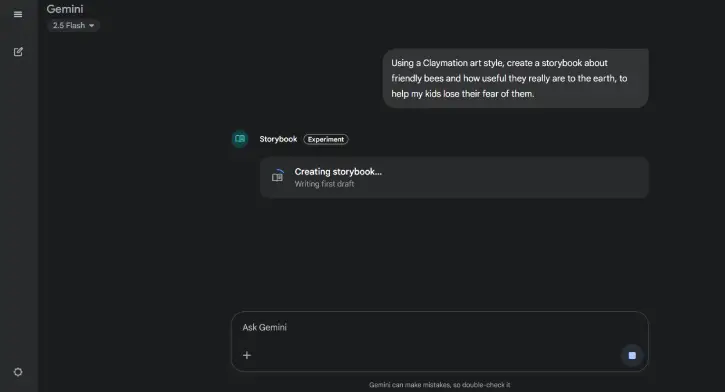
4. The prompt will create a storybook within a few minutes.
5. You can also add content like photos and other files to teach a lesson through visual storytelling.
More Details About Creating Storybook in Gemini
The Storybook feature is accessible in all languages and regions supported by the Gemini app, ensuring a wide reach for users around the world. This inclusivity enhances user engagement and creativity.
However, Google Workspace business and education users are restricted from sharing Storybooks, maintaining a level of privacy and control over content. This limitation is designed to protect sensitive information within professional environments.
Additionally, Storybooks are exclusively available to users aged 18 and older, ensuring that the content is appropriate for adult audiences. The feature is accessible globally on both desktop and mobile platforms.

