

When creating images using text prompt or editing an existing image with Gemini, Google automatically adds a visible logo to the bottom-right corner of the edited image. While this helps people identify AI-generated content, it can be annoying when using these images in creative projects.
You can now disable this watermark directly in Gemini settings, eliminating the need to crop or edit your photos manually. Google has added an option to turn off the watermark for images you create or edit in Gemini. In this guide, let us learn how to hide the watermark on images created or edited by Gemini.
How to Hide Gemini Watermark from Images?
For Gemini Web
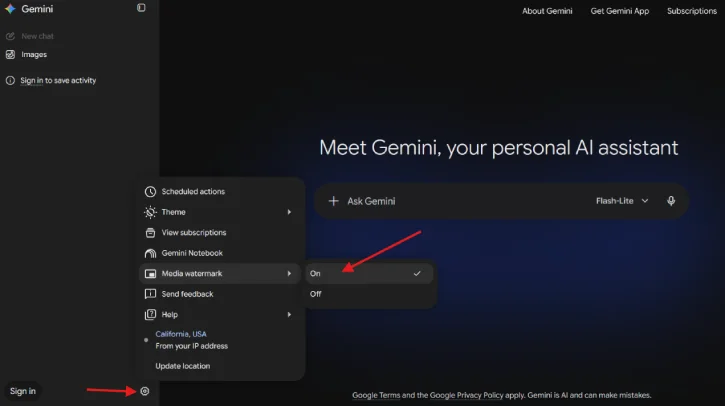
1. On the Gemini website, click the Settings cog icon in the bottom-left corner of the screen.
2. Find the Media Watermark setting and click on it.
3. Next, select Off option to disable watermark from images.
For Gemini Mobile App
1. In the Gemini Mobile app, tap your profile name to open the account menu.
2. Next, select Settings.
3. Toggle the switch for Show watermark to the off position.
FYI, even with the visible logo removed, Google still embeds a hidden SynthID watermark within the image, video, and audio files to ensure the content remains identifiable as AI-generated.
Note: If the ‘Show watermark’ option isn’t available for you, you can use Chrome extensions like Gemini Watermark Remover to remove Gemini logo from your edited image.
Note that, as of this writing, Media watermark setting for Gemini isn’t available for every user. For countries, such as India, South Korea, or Vietnam, you’ll need AI Ultra subscription to get this feature.
Final Thought
Google Gemini has image editing capabilities that let you modify and enhance images directly within the chat interface. Since it is AI-powered, the results are generated rather than traditional pixel-by-pixel edits. This means the quality and accuracy depend on how detailed your instructions are. The editing capability makes Gemini useful for quick edits and creative modifications without needing separate photo editing software.

