

Nano Banana, the AI image editing tool from Google DeepMind, can transform your photos into artistic masterpieces. Its ability to create breathtaking visuals has excited people in the AI community. What is more it is free to use, simple and really fast.
Now, Google Nano Banana, also known as the Gemini 2.5 Flash Image model, is available on WhatsApp. This means you don’t need to use the Gemini app to access Nano Banana. This guide will show you how to create Nano Banana images in WhatsApp.
Benefits of Using Gemini Nano Banana in WhatsApp
Google’s Gemini Nano Banana is a powerful, fast, and free tool for image generation. Integrating it into WhatsApp offers a user-friendly experience, making it accessible to anyone familiar with the messaging platform.
Using Nano Banana in WhatsApp simplifies the process of creating images. You can generate stunning visuals effortlessly, just like chatting with a friend, enhancing convenience and encouraging creativity without needing to switch between different apps.
How to Use Nano Banana Image Editor in WhatsApp
If you’re curious about how to use it, here’s a step-by-step guide. To achieve the best results with AI image editing tools like Nano Banana, it’s essential to craft clear and specific prompts.
1. Save the Perplexity AI number (+1 (833) 436-3285) on your phone or visit its WhatsApp chat page.
2. Tap the “Clip” icon and choose the image you want to edit.
3. Write your prompt and press enter to generate images.
4. Wait a few seconds for the chatbot to send you the edited image.
5. To save the image, tap on it, then tap the three dots, and select the “Save” button. Your image will be saved on your device.
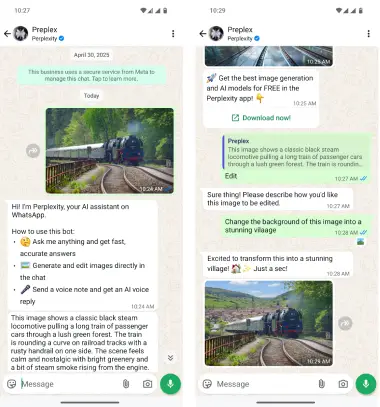
Note that Perplexity has not announced if the WhatsApp version will be entirely free. However, it is expected that there will be a basic free plan available with minimal limitations. Users who require more extensive usage may need to purchase additional credits.
Conclusion
The Gemini Nano Banana outshines the typical AI tool, offering an exceptional combination of fast, user-friendliness, and cutting-edge features. With its recent launch on WhatsApp, accessing its capabilities has become even easier and more enjoyable. You can now unleash your ideas, creativity, and imagination right within your favorite messaging app.

