

Adobe has integrated Photoshop, Express, and Acrobat directly into ChatGPT, making powerful creative tools accessible inside a single chat. Users can edit images, apply artistic effects, and request precise fixes simply by typing prompts.
Basic access to Photoshop, Express and Acrobat is free, with some feature limits, so casual users can start creating without a subscription for the applications. Here is how to connect Adobe tools to ChatGPT and how to use it.
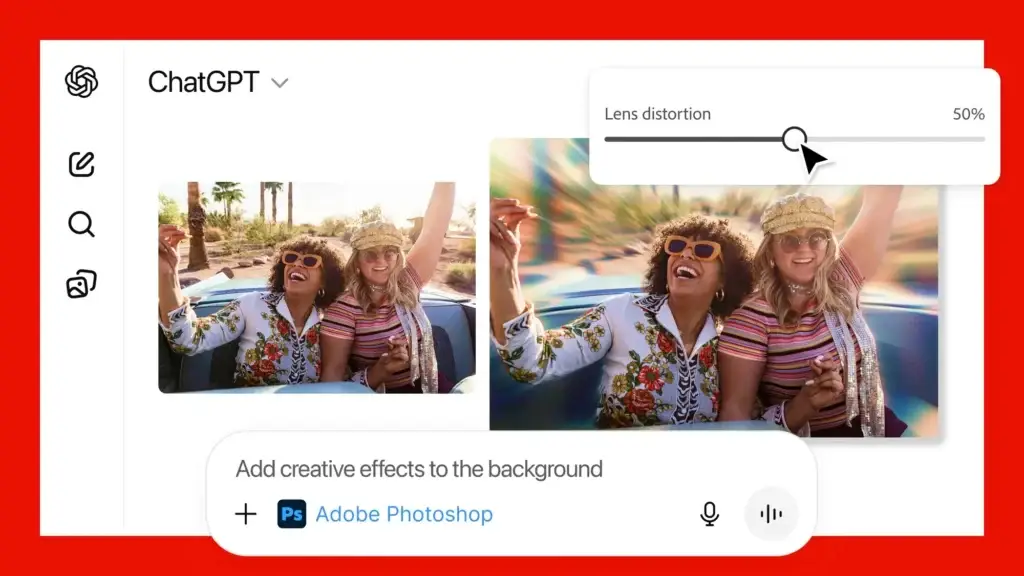
Photoshop in ChatGPT lets you change specific parts of an image, adjust exposure, brightness, or contrast, and add striking looks like Glitch or Glow. Ask for precise retouches – remove objects, fix skin tones, or sharpen details – or choose playful styles to make visuals pop. The chat format makes it easy to iterate until the result is right.
Adobe Express offers ready-made designs and templates you can customize quickly. Swap photos, add your text, animate layouts, and tweak colors or fonts through simple prompts. It’s ideal for creating social posts, flyers, and banners without design experience, and you can keep editing until the layout fits your needs.
Acrobat inside ChatGPT streamlines PDF work: edit text, extract tables, combine or organize files, compress documents, and convert files to PDF while preserving layout. It also provides tools to hide or remove sensitive information, making it safer to share documents. These features simplify common PDF tasks that used to require separate software.
How to Connect Adobe Photoshop, Express, and Acrobat to ChatGPT and Use it?
1. Open ChatGPT app on your device or go to ChatGPT website and login with your account.
2. Go to Settings and select Apps & Connectors.
3. You will see Adobe Photoshop, Adobe Express, Adobe Acrobat apps.
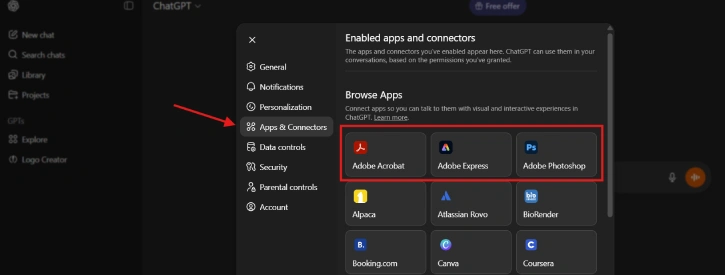
4. Select the tool you want and click Connect.
How to Use Adobe Tools in ChatGPT
1. After connecting your desired Adobe tool to ChatGPT, you can start using using it using prompts.
2. You can enter prompt with the tool command: /AdobePhotoshop, /AdobeExpress, or /AdobeAcrobat (depending on your selected app).
3. For example, upload an image and enter the prompt: “/AdobePhotoshop, blur the background in the image.”
Overall, the Adobe-ChatGPT integration brings image editing, quick design, and PDF management into one conversational interface. It lowers the barrier for non-experts and speeds up workflows for pros. Try asking the chatbot to make a few edits or convert a document—iterative changes are simple, and basic features are available for free.
Conclusion
Adobe’s new tools are now free for all ChatGPT users around the world. You can access them via the ChatGPT website or the ChatGPT app on iPhone and Android. Adobe Express is already available in the Android app, and Adobe Photoshop and Acrobat will be rolling out to Android users shortly.

