

Tired of switching between Word and other tools to get AI help on your documents? Anthropic has just made document work significantly faster and smarter with Claude for Word, a Microsoft Word plug-in that brings Claude’s powerful editing capabilities directly into the application where you already work. Here is how to add this tool to your Word.

What Is Claude for Word and How to Get it?
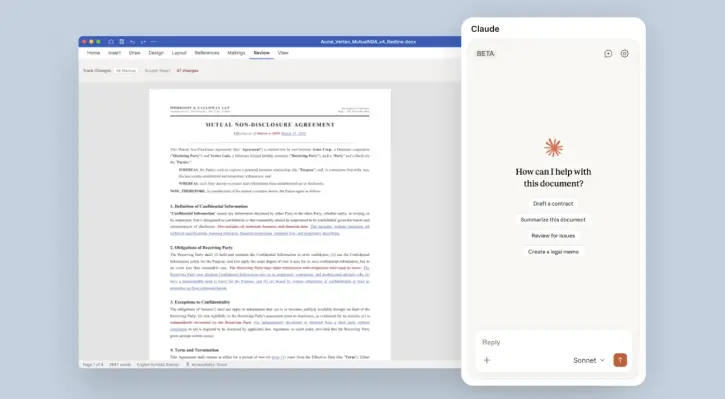
Claude for Word is a Microsoft Word plugin that lets you use Claude’s AI assistance without leaving your document. Instead of copying text to another app, waiting to get answers, and manually implementing changes, you can now highlight a section, ask Claude for help, for example to rewrite a paragraph and see the results instantly, all within Word.
The tool is designed for professionals who spend significant time editing, reviewing, and drafting documents. Whether you’re a lawyer reviewing contracts, a manager drafting reports, or a business analyst fine-tuning proposals, Claude for Word quickens the entire process.
Claude for Word Capabilities in Microsoft Word
The tool handles the full range of document tasks professionals face daily:
- Reviewing and redlining: It helps you quickly identify inconsistencies, unclear language, and areas for improvement across lengthy documents.
- Drafting from templates: It can generate initial versions of sections or entire documents based on your templates and specifications.
- Editing clauses: It helps you refine specific passages while maintaining document structure and formatting.
- Managing comments: Work through comment threads and feedback without losing context.
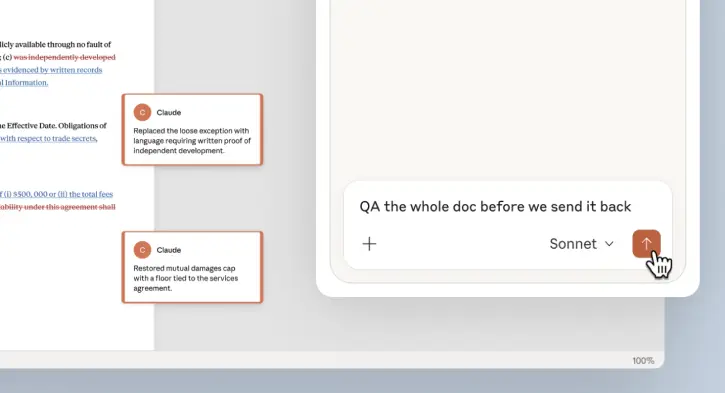
- Consistency checks: Run final reviews to ensure tone, terminology, and style align throughout the document.
Claude for Word serves three core professional needs:
Legal professionals use it to quickly assess contract changes, flag potential issues, and draft responsive language while maintaining consistency across complex agreements.
Business writers leverage it to accelerate drafting from templates, generating initial sections based on their style and requirements for faster, more consistent output with full control over tone and messaging.
Quality assurance teams deploy it as a final consistency check before distribution, catching terminology mismatches, formatting inconsistencies, and style deviations that human eyes might miss in lengthy or multi-author documents.
How to Get Claude by Anthropic for Word Plug-in
You can add Claude by Anthropic for Word plug-in by going to Microsoft Marketplace here and clicking the “Get it now” button. Note that Claude for Word is currently available in beta for customers on Claude Team and Enterprise plans only.
As of this writing, Claude for Word is available in beta for customers on Claude Team and Enterprise plans. Anthropic hasn’t announced a timeline for rolling it out to lower-tier plans, so this feature is currently reserved for organizations with more advanced subscriptions.
The integration is part of Anthropic’s broader Claude Cowork product, which is expanding to include additional enterprise controls as more businesses adopt AI across different departments and functions.
Conclusion
Claude for Word transforms document editing from a time-consuming, back-and-forth process into an efficient, AI-assisted workflow. By keeping Claude inside the application, you already use, eliminating the need to copy-paste text, and maintaining full transparency through tracked changes, it solves real pain points that professionals face every day.

