

What is RAM Booster on Nothing Phone and How to Enable it
Nothing phone has a built-in feature to add extra RAM on the device, for example, 2GB, 4GB, or 8GB, to improve the performance when...

Nothing Phone 4a Pro Wallpapers: Download Official Stock Designs
Nothing has officially unveiled the Phone 4a Pro, marking a significant upgrade in the company's midrange smartphone lineup. Beyond the impressive hardware - featuring...

How to Use Ente Locker to Secure Your Data with End-to-End Encryption
Ente Locker is a free, open-source file locker app available for Android and iOS that protects your sensitive data (documents, IDs, credentials, etc.) with...

How to Check the Play Integrity Test from the Play Store: A Step-by-Step Guide
Play Integrity Check is a crucial security feature designed to safeguard Android devices from various forms of abuse, such as cheating, fraud, and unauthorized...
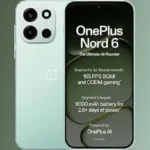
Download OnePlus Nord 6 Official Wallpapers for Free
OnePlus launched Nord 6 that brings flagship-level performance to an accessible price point, mirroring the quality of the OnePlus 15. Key highlights include the...

How to Make Calls and Send SMS via ADB Commands
In certain situations, you may want to make phone calls or send text messages using ADB (Android Debug Bridge) commands on your Android phone,...

Guide to Rollback or Uninstall Google Play System Update (2 Methods)
Beginning with Android 10, Google introduced a feature that allows some system updates to be sent directly from the Google Play Store. This Google...
