

Microsoft recently introduced the new Copilot app and Copilot+ PCs at its Build 2024 event. The updated Copilot app features a new user interface and gives more flexible experience. It supports drag-and-drop, window resizing and better multitasking. These features make it easier to work with Copilot app. Users can now move it around on their screen freely.
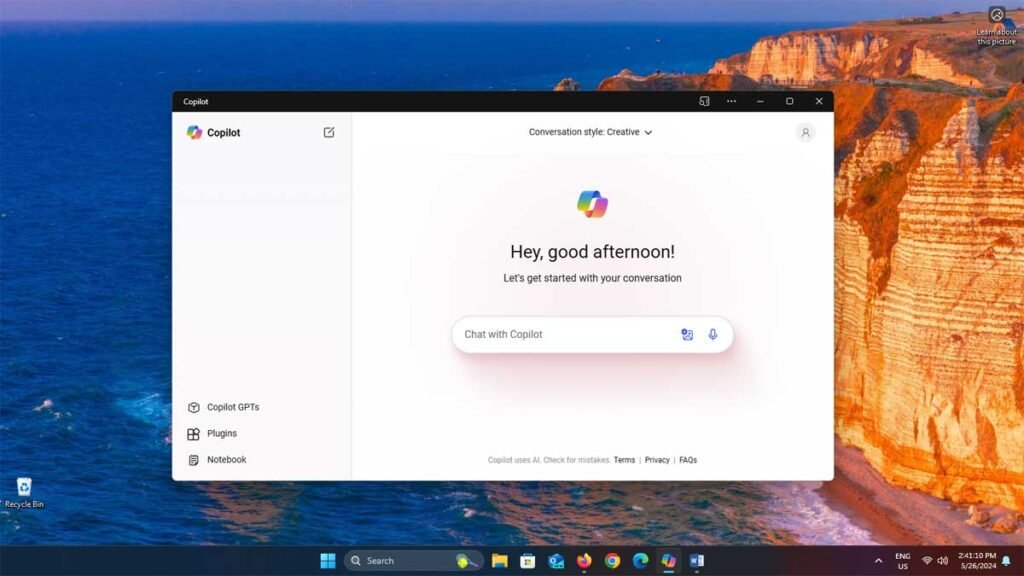
The all-new Copilot app is now available in the Windows 11 24H2 preview build for testers. The app for Windows will roll out in phases; however, all Windows 11 users can currently experience the new Copilot interface through a simple workaround.
The Copilot app (it is a Progressive Web App) is now available and can be installed on your PC. It works on Windows 11 and Windows 10 as well. You can resize it or use it in full-screen mode, just like any other Windows app. In addition to the refreshed design, the app supports dragging and dropping files directly into Copilot when using side-by-side mode.
Update: Microsoft has released an updated Copilot app on Microsoft Store for Windows 11 and 10 users. It is a Progressive Web App, so users need to Microsoft Edge browser on their PC to install it. Interested users can download the Copilot app from Microsoft Store here.
How to Install Copilot App (PWA) on Windows?
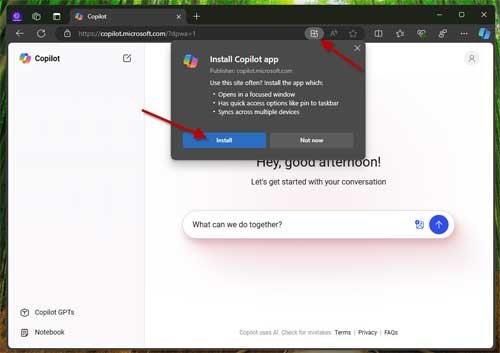
1. Open the URL “https://copilot.microsoft.com/?dpwa=1” in Microsoft Edge browser.
2. You will see an app icon appears inside the address bar. Click on it and select the Install app option.
3. Once the installation completes, it will ask to pin to Taskbar and Start menu. Click on the Allow button.
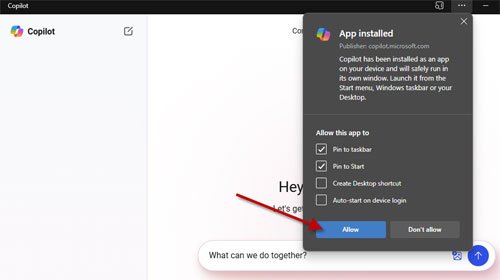
You can now access the new Copilot app right from your Taskbar. You can resize or use it in full-screen mode, drag and drop files or images for analysing and more.
Conclusion
For your information, Microsoft has also confirmed that the latest GPT-4o model from OpenAI will be available in Copilot for Windows 11 soon. It will bring some amazing capabilities like screen sharing while playing games and many other cool features.
Note: This article was first published in May 2024 and updated in August 2024 with additional details.

