

Microsoft added a feature to lock a Windows 11 PC remotely using your Android phone. The Phone Link for PC and Link to Windows apps for Android now let all users lock their PC from their phone. Here’s how to lock your PC instantly from your Android device.
Your Windows 11 PC will automatically lock after a period of inactivity. However, if you want to lock your PC instantly when you step away, Microsoft’s Link to Windows app let you do it. This feature is useful – for example, at work to prevent others from accessing your data when you’re not at your PC.
To get this feature, you will need to update Phone Link and Link to Windows apps to the latest version, then link your Android phone to Windows 11 via the Phone Link app to enable this feature.
How to Lock Your Windows 11 PC Remotely From Your Android Phone
1. Open the Link to Windows app on your Android phone.
2. If multiple computers are linked, open the profile menu and select the target PC.
3. Tap the Lock PC button.
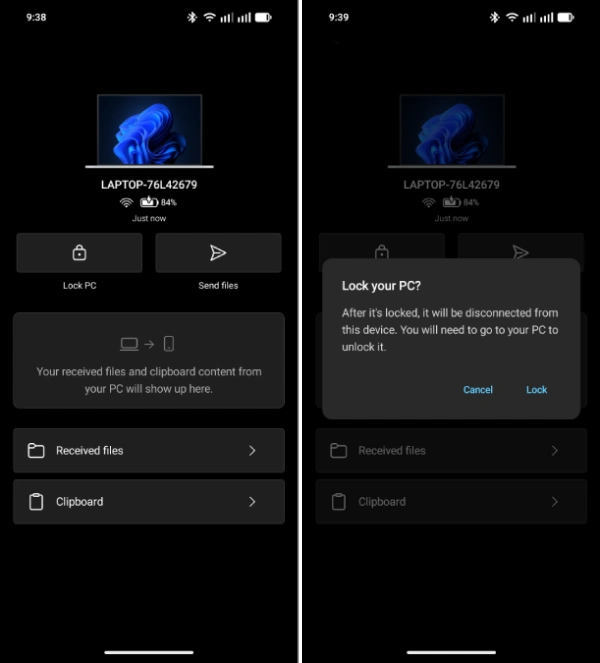
4. Your computer will lock immediately.
5. To unlock, go to the computer and unlock it physically.
ALSO READ: O+ Connect: Connect Your OnePlus/Oppo Phone to a Mac/iPhone/iPad
Prepare and enable Phone Link between your Android phone and Windows 11 PC
Before proceeding, install the Link to Windows app on your Android phone and sign in with the same Microsoft account used on the Windows 11 PC. After then link your phone to your PC.
1. On your PC, open Settings → Bluetooth & devices.
2. Click Mobile devices.
3. Turn on the Phone Link toggle.
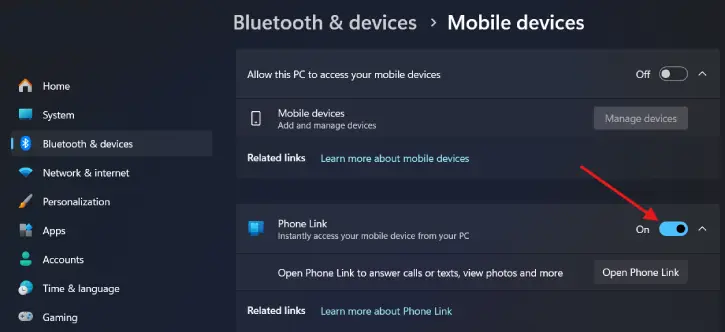
4. Follow the on-screen instructions to link your PC with your Android phone.
5. Enable Allow this PC to access your mobile devices.
6. Click Manage devices and turn on Remote PC controls.
7. After completing these steps, you can lock your computer from your Android phone.
Other useful features Microsoft recently added to the Link to Windows app include: sending files from an Android phone to your PC, accessing the Windows 11 clipboard from your Android phone, mirroring your Android screen to your PC, and browsing your phone’s photos in File Explorer.
Conclusion
The Microsoft Phone Link app includes a Remote PC lock feature that lets you lock your Windows 11 computer from your Android phone instantly once devices are linked and Remote PC controls are enabled. It’s useful for quickly securing an unattended PC without physical access; unlocking still requires someone at the computer. Currently, this feature isn’t available for iOS devices.

