

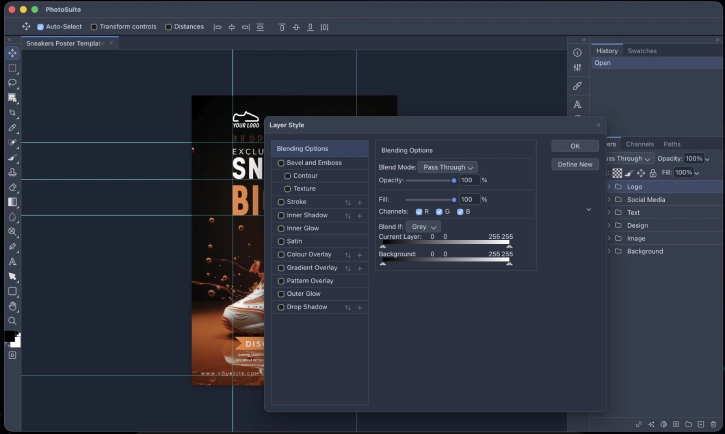
PhotoSuite is a free, open-source image editor for Windows, Linux, and macOS that offers a Photoshop-like experience, with familiar panel layouts, keyboard shortcuts, dialog boxes, and native support for PSD and PSB files. It also supports a comprehensive range of raster, vector, digital design formats, and even Photoshop Actions.
Download and Installation of PhotoSuite Image Editor
The application is suitable for those who are looking for a free Photoshop alternative for image editing, however we cannot say it is completely replacement for Photoshop.
You can download the GPL-3.0-licensed PhotoSuite app from GitHub (link) for Windows, Linux or macOS, and install on your computer just like other applications.
FYI, the app runs entirely on your device, with no cloud dependency or telemetry. Built with Tauri 2 as an HTML5 and WebAssembly app, it stays lightweight while still delivering the power of a desktop application.
Key Features of PhotoSuite Image Editor
PhotoSuite is especially notable for its native support for PSD and PSB files. It doesn’t just open and save them — it is the primary document format of the app, which helps preserve layers, masks, smart filters, color profiles, and other details.
It also offers a full range of image editing tools, including raster and vector layers, Smart Objects, non-destructive Smart Filters, layer styles, selection tools, and advanced features like Liquify and Lens Correction.
Its text engine is another highlight, with support for complex script shaping, bidirectional text, OpenType ligatures, and text-on-path effects.
On top of that, the app supports automation through Photoshop Actions, JavaScript scripting, and a plugin system built with HTML, CSS, and JavaScript.
Final thought:
PhotoSuite is an open-source choice for creators who want that Photoshop feel without being locked into the cloud. What really sets it apart is how it handles PSD and PSB files natively—so you’re not fighting compatibility issues. Add in its broad format support and automation capabilities, and you’ve got a tool that can genuinely handle serious editing work, not just casual touch-ups.

