

Collabora Online is free Office suite for home and startup use, handles all your docs, spreadsheets and presentations, and best of all, you can run it yourself instead of relying on the cloud. If you’ve been using Collabora Online, you’re going to like what’s coming in version 26.04.
The team just rolled out some genuinely useful updates that make working on documents, spreadsheets, and presentations a lot smoother—especially if you’re collaborating with others.
Table of Contents
The AI Assistant in Office Suite (But Only If You Want It)
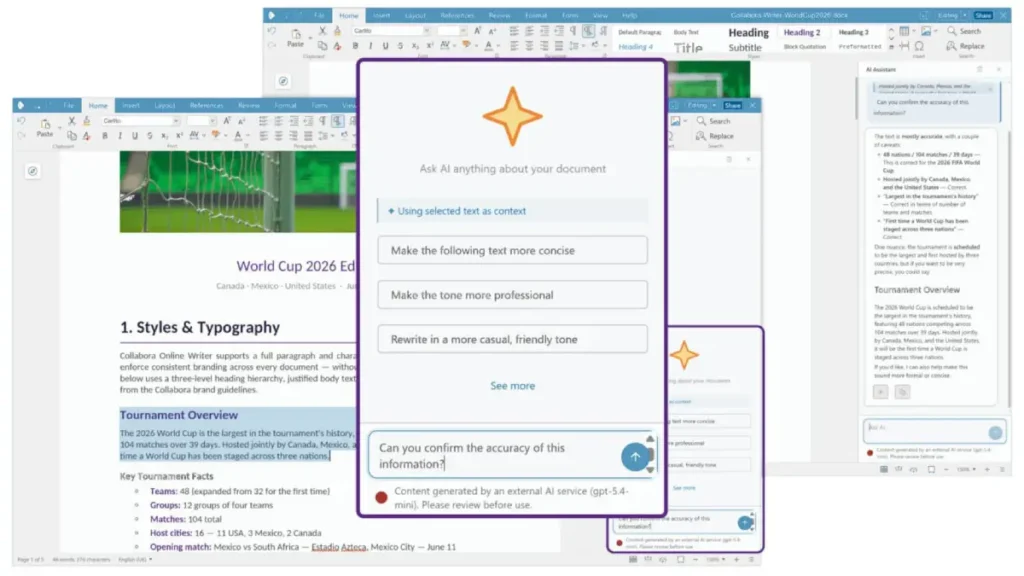
Collabora Online now has an optional AI assistant built right into Writer, Calc, and Impress. But before you get worried about your data flying off to some random server, here’s the thing—this isn’t turned on by default, and you’re in complete control.
Want the AI to help draft emails or summarize your writing in Writer? It can do that. Need help troubleshooting a formula in Calc or analyzing spreadsheet data? It’s there. Working on a presentation in Impress? The assistant can turn your rough notes into structured slides.
Your organization decides whether to use it, who the AI provider is, and whether it runs on your own servers or in the cloud. Plus, the assistant can’t touch your documents without your permission. That’s the kind of AI integration we actually want to see.
Comparing Documents Just Got Smarter
One feature that’s genuinely going to save time is the improved document comparison in Writer. You can now pull up an older version of your document—whether it’s saved locally or on a server—and compare it side-by-side with what you’re working on now.
All the changes show up color-coded: insertions, deletions, moved content. You’ll see who made each change and when. Whether you prefer the tracked-changes interface or a simple side-by-side view, you’ve got options. It’s the kind of feature that makes reviewing document history feel effortless instead of painful.
Markdown Love
For anyone working with documentation systems or publishing workflows, Collabora Online now handles Markdown files. You can import Markdown, and the formatting—like headings—automatically converts to proper document styles. And if you’ve got an old DOCX or ODT file? Export it as Markdown and you’re good to go.
Other Wins Worth Mentioning
Writer picked up some nice quality-of-life improvements: a multi-page view for long documents, better comment cards, sharper PDF rendering (including comments in the margins now), and a redesigned Navigator with better search. The sidebar also shows you style previews so you can see what you’re applying before you apply it.
Calc got personal sheet views, new functions, table styles, and smarter pivot table handling. Impress users can now use Follow-Me mode so your audience can see exactly which slide you’re on as you present, plus better multi-monitor support and improved font handling.
The Bottom Line
Collabora Online 26.04 feels like a release where the team listened to actual users. Nothing here is flashy for flashy’s sake—it’s all about making real work easier and collaboration smoother. The optional AI is nice, but honestly, the document comparison and Markdown support might be the features that change how you work day-to-day.
If you’re running a supported deployment, check with your provider about when you’ll get the update. Either way, it’s worth keeping an eye on.

