

Gemini, Meta AI, ChatGPT, and other AI apps on your Android phone work better when they can access your data. However, allowing these AI services to connect more closely to your personal information can lead to privacy concerns. Also, accessing your personal data helps AI service providers like Google Gemini serve ads more effectively.

Google Gemini can now access information from connected apps, such as WhatsApp, Phone, Messages, and YouTube, and share information with these apps to provide the most relevant responses.
You can choose which apps Gemini connects to in the settings, but just turning off Gemini’s app activity won’t be enough. Here’s how to stop Gemini from accessing apps on your Android device.
How to Stop Gemini From Accessing Apps on Your Android Phone
Here are the steps to check the applications that the Gemini AI application has access to on your Android device.
1. Open the Google Gemini app on your Android device.
2. Tap your profile icon in the upper right corner of the screen.
3. Select “Apps” from the menu that appears.
4. On this page, you’ll see a list of apps connected to Gemini.
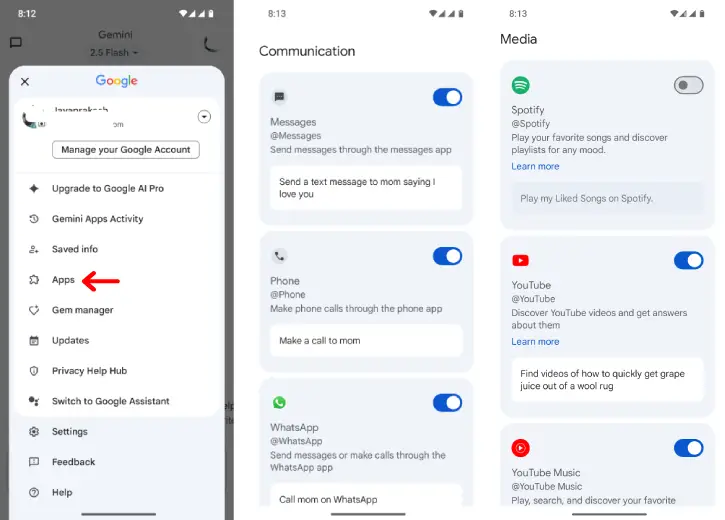
5. You can turn off any apps you don’t want from this list by taping the toggle.
6. Once you’re finished, go back and tap on “Gemini Apps Activity.”
7. This will take you to a Google webpage where you can turn off the activity.
Conclusion:
That’s all you need to know about stopping Gemini from accessing your apps on your Android phone. If you don’t plan to use the Gemini app or any other AI apps, you can also uninstall them. This will prevent the service from accessing any personal information or data on your device.

