HomeTechnologyTurn Your Smartphone into a Powerful Dashcam: A Complete Guide for 2026

Turn Your Smartphone into a Powerful Dashcam: A Complete Guide for 2026

Published on

Dashcams protect drivers by recording incidents, helping with insurance claims, and deterring theft. If your car lacks a built-in camera, you can use your Android or iPhone as a reliable dashcam with the Weel app. It records automatically, provides turn-by-turn navigation, supports front/rear camera switching and cabin audio, and shares incident clips quickly with insurers.

Turn Your Smartphone into a Powerful Dashcam

Dashcams have become an essential safety tool for modern drivers, providing crucial evidence and protection in various driving scenarios. While traditional dashcams can be expensive and complicated to install, smartphones now offer a convenient, cost-effective alternative.

Why Use Your Phone as a Dashcam?

  • Cost-effective: No expensive hardware or professional installation needed.
  • Multi-purpose: Navigation + continuous video recording in one app.
  • Easy evidence sharing: Detects incidents and helps send clips to insurers fast.
  • Flexible views: Switch between front road view and rear/cabin view.
  • Portable: Use the same setup across different vehicles.

Key Features of Phone Dashcam

  • Automatic recording when you start driving — perfect for daily commuting or road trips.
  • Front and rear camera switching for road and cabin recording.
  • Crash/incident detection and instant alerts for quick action.
  • Built-in navigation with turn-by-turn guidance — records your route and location metadata.
  • Archive of saved videos for evidence, insurance claims, or review.
  • Microphone support for in-car audio capture (toggleable for privacy).

Step-by-Step Guide to Setting Up Your Android Phone or iPhone Dashcam

1. Download Weel app from the Play Store or App Store.

2. Launch the app and create an account with email or Google login.

3. Open the hamburger menu → Settings → Recording. Enable Cabin camera and Microphone audio if desired.

4. Return to the main screen and enter your destination.

5. Start driving — recording begins automatically.

6. To access footage, open the hamburger menu → Archive.
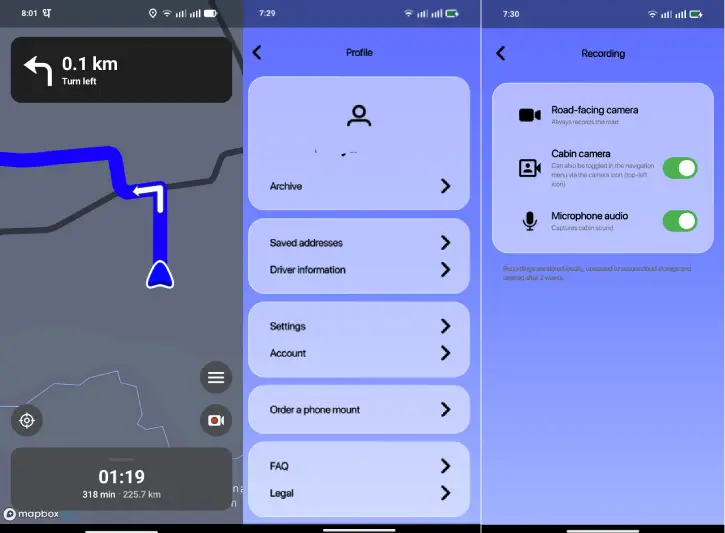
Setting Up Your Android Phone or iPhone Dashcam

From app’s settings menu (hamburger > settings), you can change map style, recording, unit of measure and language.

ALSO READ: Add AI DasCam and ADAS Features to Your Car Using Magic Earth and Phone

Best Practices for Using a Phone as a Dashcam

  • Mount your phone securely on the windshield or dashboard using a reliable phone mount.
  • Keep the phone plugged into a charger for long trips to avoid battery drain.
  • Respect local laws about recording audio and privacy — disable cabin audio when required.

FAQs

Q: Is the Weel app completely free?
Yes, the basic version is free. However, advanced features might require a premium subscription.

Q: How secure are the recordings?
Recordings are stored in a personal cloud, accessible only through your account, ensuring privacy and security.

Q: Can I use the app for both navigation and recording?
Absolutely! The Weel app seamlessly integrates navigation with dashcam functionality, providing turn-by-turn guidance while recording your journey.

Conclusion

In 2026, transforming your smartphone into a dashcam is not just convenient—it’s becoming a standard safety practice. With apps like Weel, drivers can easily document their journeys, protect themselves legally, and have peace of mind on the road.

JP
JPhttps://infointech.com
JP (Jayaprakash), how-to expert and web geek with twenty+ years of experience, shares his knowledge through blogging filled with practical tips and guidance to help you enhance your tech skills.

Latest articles

How to Analyze Excel & Google Sheets Data in Minutes Using Claude AI

Manually analysing Excel and Google Sheets datasets can eat up hours of your time....

How to Create a Custom Search Box in Excel (Step-by-Step Guide)

Working with massive spreadsheets can be frustrating. You know the data you need is...

Why Your Word Document Layout Looks Wonky (And How to Fix It)

You've spent an hour tweaking your document layout, but something still feels off. That...

Getting Realistic Averages: How to Exclude Outliers in Excel and Calc

Ever calculated an average only to realize it's completely skewed by one or two...

More like this

How to Change the Default Search Engine in Microsoft Edge (Windows, Android, iOS)

Changing the default search engine in Microsoft Edge is a simple process that can...

How to Fix Android Auto Connection Issues [11 Methods]

Android Auto connectivity issues have become increasingly common. Recently, users of devices such as...

Control App Notifications and Calls While Driving on Android Auto

Android Auto is designed with safety in mind, offering customizable settings to minimize dangerous...