

Microsoft is gearing up to unveil a significant update to Windows 11 24H2, incorporating advanced AI functionalities, machine learning elements, along with a slew of new features and enhancements. However, it’s worth noting that Windows 11 version 24H2 will not boot, if your PC does not meet the required CPU feature.
According to reports, Windows 11 version 24H2 necessitates a processor instruction called Population Count (POPCNT) for installation. The main requirement is that your CPU must support SSE4.2 (Intel) or SSE4A (AMD) to upgrade your computer to Windows 11 24H2 update or to reinstall the operating system.
Descoverd by a user on X (Twitter), Windows 11 build 26080 inhibits the booting of the operating system if the processor lacks support for SSE4.2 or SSE4A. In such cases, Windows 11 will automatically reboot the device.
How to Know if Your CPU Supports SSE4.2 or SSE4A?
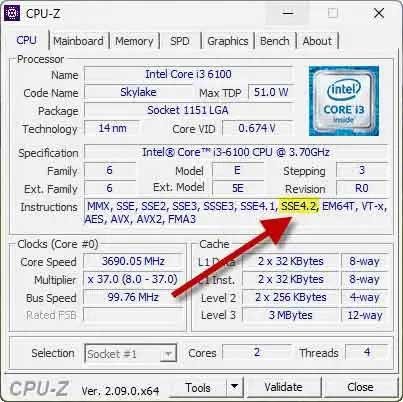
You can easily identify whether your CPU supports SSE4.2 or SSE4A or not. All Intel processors introduced after 2008 Provide support for POPCNT or SSE4.2. Here’s how you can verify it:
- Download and install the CPU-Z app (link) on your computer.
- Launch the CPU-Z app. It will scan your PC and generate a detailed report of its components.
- In the CPU tab, look for the Instructions section.
- If your computer has an Intel processor, look for SSE4.2. If you have an AMD processor, look for SSE4A.
- SSE4.2 and SSE4A indicate that your processor supports POPCNT and Windows 11 version 24H2.
Other Requirement to Upgrade to Windows 11 24H2
Along with the required CPU features ( POPCNT and SSE4.2/4a instruction set), the Windows 11 version 24H2 update won’t install if you have certain old applications (for example, StartAllBack), and old drivers (for example, Realtek 8192su Wireless USB 2.0 adapter driver) installed on your computer.
Windows 11 24H2 Release Date and Expected Features
The stable release of the Windows 11 24H2 update is expected to roll out later this year, possibly in September 2024. Among the exciting new features included in this update are:
- Advanced Copilot: Enhancing productivity and collaboration.
- AI Super-Resolution: Improving image quality and clarity.
- AI Cowriter in Notepad: Assisting with writing tasks.
- AI Voice Clarity: Enhancing audio quality.
- AI depth wallpapers: Adding visual depth to wallpapers.
- New Snap layout suggestions: Streamlining window management.
- Scrollable Quick Settings panel: Making system adjustments more accessible.
- Sudo command from Linux: Facilitating command-line operations.
- 7zip and TAR archive support: Expanding file compression options.
- New Energy Saver mode: Optimizing power consumption.
These enhancements promise to enhance the Windows 11 experience for users!

