

HomeTechnologyHow to Fix the New/Folder Option Missing in the Right-Click Menu on...

How to Fix the New/Folder Option Missing in the Right-Click Menu on Windows 11

Published on

If you are using Windows 11 and have noticed that the “New or Folder” option is missing from the right-click menu, don’t worry. This issue can be easily fixed by following a few simple steps.

There are several reasons for the missing “New/Folder” option from the right-click menu of Windows 11. Missing or corrupt Windows registry key, third-party or incompatible software, for example, older version of Photoshop, etc. are the some of the common reasons for missing folder option on Windows 11 PC.
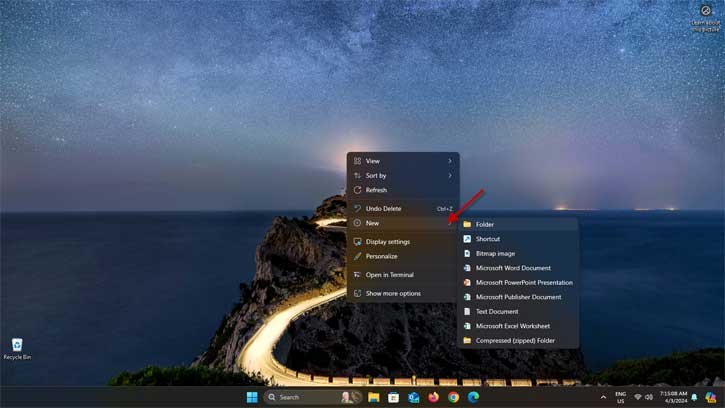
Fix New/Folder option missing issue on Windows 11

Step 1: Open Registry Editor

To begin, press the Windows key + R on your keyboard to open the Run dialog box. Type “regedit” and press Enter to open the Registry Editor.

Step 2: Navigate to the Appropriate Registry Key

In the Registry Editor, navigate to the following key:

HKEY_CLASSES_ROOTDirectoryBackgroundshellexContextMenuHandlersNew

Step 3: Modify the Registry Value

Once you have reached the “New” key, double-click on the (Default) value on the right-hand side. In the Edit String dialog box, make sure the value data is set to {D969A300-E7FF-11d0-A93B-00A0C90F2719}. If it is not, enter this value and click OK.
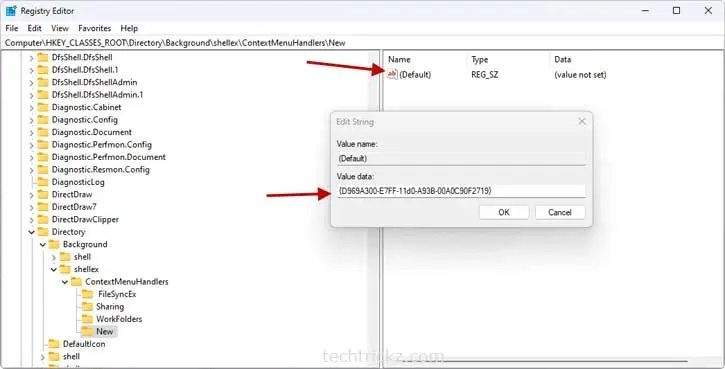
Restore New Folder option on Windows 11

Step 4: Restart Your Computer

Finally, restart your computer to apply the changes. Once your computer has restarted, the “New/Folder” option should be restored in the right-click menu.

By following these steps, you should be able to fix the missing “New/Folder” option in the right-click menu on Windows 11. If you encounter any issues or have further questions, feel free to reach out to Microsoft support for assistance.

JP
JPhttps://infointech.com
JP, how-to expert and web geek with twenty+ years of experience, shares his knowledge through blogging filled with practical tips and guidance to help you enhance your computer and smartphone skills.

Latest articles

How to Remove Web Ads Without Extensions: Reader Mode in Chrome, Edge & Firefox

Tired of intrusive ads cluttering your web pages? You don't need to install a...

How to Fix Driver Installation Failures on Windows 11: 6 Working Solutions

Driver installation failures on Windows 11 are frustrating, but they're usually easy to fix....

Generate Free Music in Your Language with Google Producer AI: Complete Guide

Google Producer AI is now available through Google Labs, offering creators a powerful way...

Samsung Galaxy S26 Ultra Privacy Display: How to Enable for Specific Apps & Use It

Samsung's latest flagship smartphone, the Galaxy S26 Ultra, introduces an innovative hardware feature that...

More like this

How to Fix Driver Installation Failures on Windows 11: 6 Working Solutions

Driver installation failures on Windows 11 are frustrating, but they're usually easy to fix....

Samsung Galaxy S26 Ultra Privacy Display: How to Enable for Specific Apps & Use It

Samsung's latest flagship smartphone, the Galaxy S26 Ultra, introduces an innovative hardware feature that...

AppControl vs Task Manager: The New Windows 11 Performance Monitoring Tool

Task Manager has been the standard tool for monitoring system performance on Windows for...