

Microsoft is aiming to create a more personal and intelligent computing experience for the future. Their vision involves seamlessly integrating AI into every aspect of Windows, from the underlying system architecture to the hardware components themselves. This integration has the potential to not only streamline users’ computing experiences but also enrich them. However, to take full advantage of these AI features, your Windows 11 PC will need to be AI-enabled.
This guide lets you know if your Windows 11 PC is AI-enabled. The main difference between an AI-enabled PC and a standard one lies in the hardware. AI PCs utilize specialized components, like Neural Processing Units (NPUs), to tackle specific tasks. These types of PCs can significantly improve your productivity and efficiency.
The presence of a Neural Processing Unit (NPU) in your computer is a strong indicator of AI capability. However, according to Microsoft, an additional component called a Copilot key is also necessary for a PC to be classified as truly AI-enabled. Let’s know how to check if your system has an NPU.
How to Check Whether Your Windows PC has an NPU?
There are two methods to determine if your PC is AI-enabled. You can check either the Task Manager or Device Manager to know whether your PC supports AI capabilities.
Checking for an NPU with Task Manager:
- First, right click on the taskbar on your Windows 11 PC and select Task Manager.
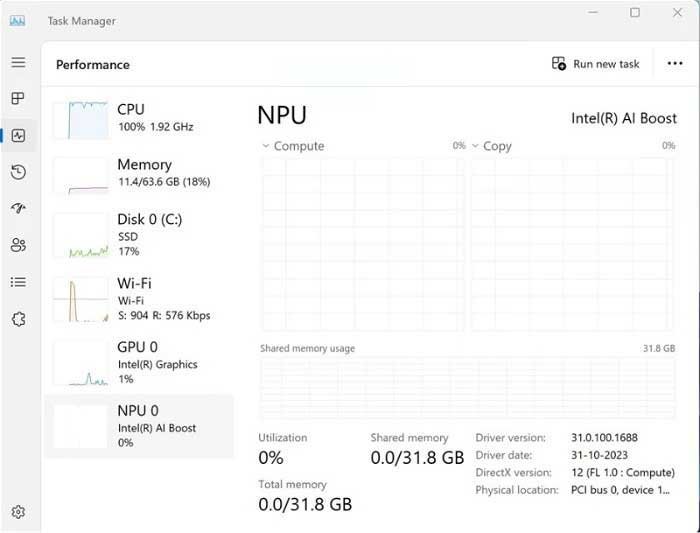
- Navigate to the Performance tab.
- If your PC has an NPU, you’ll see a section labeled “NPU” within the Performance tab (refer to the screenshot if needed).
Checking for AI Capabilities with Device Manager:
Another way to see if your Windows 11 PC is AI-enabled is through Device Manager. Here’s how:
- Right click on the Start button and select Device Manager.
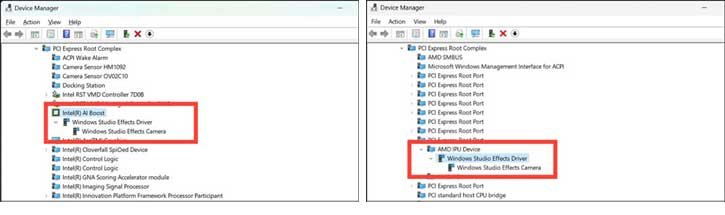
- In Device Manager look for Intel AI Boost, if you have an Intel system.
- If you have an AMD system, look for AMD IPU Device.
- If you see “Intel AI Boost” or “AMD IPU Device” listed in Device Manager, your PC likely has AI capabilities.
What is a Neural Processing Unit (NPU)?
As you may know, NPU is a specialized chip on a computer’s main processor (often called a System on a Chip or SoC). It is designed to speed up tasks related to artificial intelligence (AI). Unlike the central processing unit (CPU) or graphics processing unit (GPU), which handle a wide variety of tasks, NPUs are optimized for data-driven parallel computing, that makes the NPU to handle tasks such as video editing, picture processing, voice recognition and other AI work.
The main purpose of NPUs is to execute machine learning algorithms, particularly those based on artificial neural networks (ANNs) or random forests (RFs). It is achived by using specialized circuits that are highly efficient for neural network computations. Because of that the NPU can do AI work faster than a CPU or a normal GPU.
FYI, NPUs are integrated directly into the main CPU, like those found in Intel Core and AMD Ryzen laptop processors. In data centers or in special industry machines the NPU can be a stand‑alone chip that sits separately from other parts, on the board.

