

Perplexity has expanded its services to WhatsApp, making it easier for users to access the AI assistant through the widely-used messaging platform without the need to download a separate app. In this guide, let us learn how to utilize Perplexity AI on WhatsApp.

Perplexity’s WhatsApp integration provides a convenient way to quickly and efficiently chat with the AI assistant. This functionality is also available for ChatGPT.
Of course, WhatsApp has its Meta AI chatbot, but users who prefer the unique capabilities of Perplexity AI can now interact with it directly within the WhatsApp interface. This allows for seamless communication for those who rely on WhatsApp, eliminating the need for app installations or account sign-ups.
How to Use the Perplexity AI Chatbot on WhatsApp
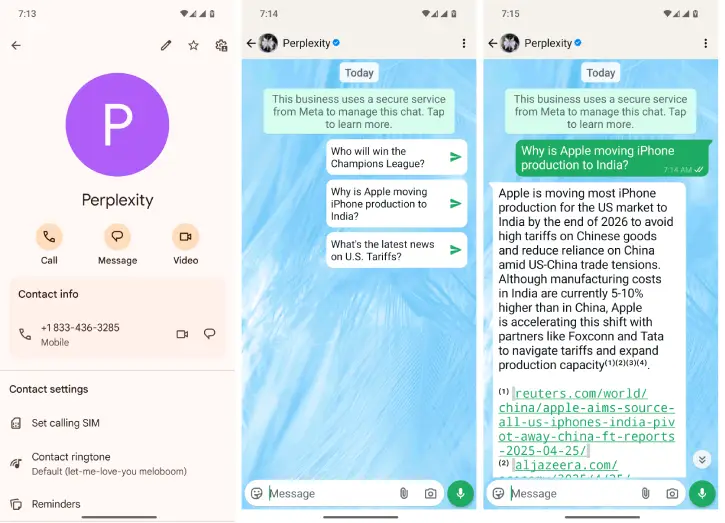
1. Open the Phone app or Contacts app on your smartphone and save the number +1 (833) 436-3285. You can assign any name (for example Preplexity) to this contact.
2. Start a new WhatsApp chat using the saved phone number
[If the contact doesn’t appear, enter the number in the search bar and select Perplexity’s name to initiate the chat.]
3. Once connected, you can ask questions, conduct research, summarize lengthy message, and even create custom AI images in WhatsApp.
ALSO READ: How to install Perplexity AI App on Windows 11
Benefits of Using Perplexity AI on WhatsApp?
- Get immediate responses to your queries without switching apps.
- It helps you enrich your discussions and explore new ideas.
- Offers a seamless experience within the WhatsApp environment.
- From research to creative ideas, Perplexity AI can assist with a wide range of tasks.
Perplexity AI in WhatsApp lets you ask questions and receive instant answers for any subject you like, all within the familiar WhatsApp interface. This feature is useful, especially for those who prefer to use a single, unified messaging app for their daily communication needs.
That’s all how to use Preplexity AI inside WhatsApp. This integration not only simplifies your communication but also empowers you to make the most of your interactions.

