

A new update for Windows 11 (KB5041585) is causing problems for users who have a dual-boot system with both Windows and Linux on their computer. Microsoft has confirmed the issue but far there is no solution available (as of this writing). But there is a way to fix the problem for computers that run both Windows 11 and Linux.

After installing the August 2024 security update (KB5041585) for Windows 11 versions 23H2 and 22H2, some dual-boot systems stopped working. Users are now unable to start their Linux system. When trying to boot into Linux, users are getting the error message “Verifying shim SBAT data failed: Security Policy Violation. Something has gone seriously wrong: SBAT self-check failed: Security Policy Violation.“
What is the Reason for Linux Boot Failure Issue on Dual Boot Windows 11 PC?
The reason for the dual-boot issue in Windows 11 is due to the UEFI SBAT (UEFI Secure Boot Advanced Targeting) settings. The KB5041585 update employs a UEFI Secure Boot Advanced Targeting (SBAT) setting on devices running Windows to block older, vulnerable boot managers in order to enhance security.
Though, the SBAT update is not intended to automatically apply if the system detects a dual-boot configuration, it fails to recognize custom dual-boot setups on some devices and applies the SBAT update, causing the Linux boot failure.
Note that this is not primarily a Microsoft problem, but rather a necessary security update that affects some Linux distributions using outdated or vulnerable bootloaders.
How to Fix Linux Boot Failure Issue on Dual Boot Windows 11 System?
To resolve this issue, Linux users need to update GRUB or disable the SBAT policy on the Linux side. Here is a workaround (temporary) method to fix the Linux boot failure issue after installing the KB5041585 update on a dual boot Windows 11 system.
1. First, open the Registry Editor.
2. Next, navigate to: HKEY_LOCAL_MACHINE\SYSTEM\CurrentControlSet\Control\SecureBoot\SBAT
3. On the right pane of the Registry editor, create a new DWORD (32-bit) Value and name it OptOut.
4. Next, double-click the OptOut value and set its value data to 1.
5. Click OK to save the setting.
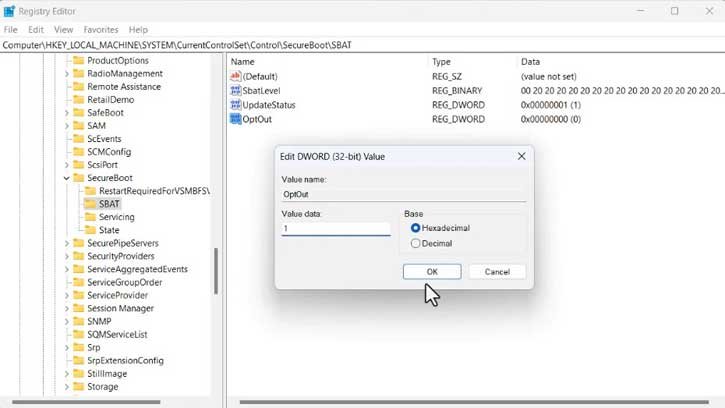
The above workaround will prevent the SBAT update from installing on your device, avoiding the Linux boot failure issue. Microsoft is actively working with Linux distros to fix this problem, but until then, this is the only solution you can try to fix the Linux boot failure on a dual boot Windows 11 system.

