

The AI assistant is now a built-in feature of popular web browsers. Following Microsoft Edge, Chrome, Brave, and Opera, Firefox is introducing an AI assistant called Orbit. The Orbit AI and Content summarizer help you easily summarize emails, documents, articles, and videos across the web.
Orbit AI assistant (currently in Beta) can be integrated into the browser by installing its extension from Firefox Add-on Store. In this iteration of Orbit AI, Mozilla employs the open-source Mistral LLM (Mistral 7B), which is hosted on Mozilla’s Google Cloud Platform. At this time, the beta version of Orbit is only available in English.
Table of Contents
Steps to Enable and Use Orbit AI Assistant in Firefox Browser
1. Go to Firefox Add-on Store and install the Orbit Summarizer.
2. It requires permission to access your browsing data and tabs, so grant required permissions.
3. Now, navigate to any webpage or email you wish to summarize.
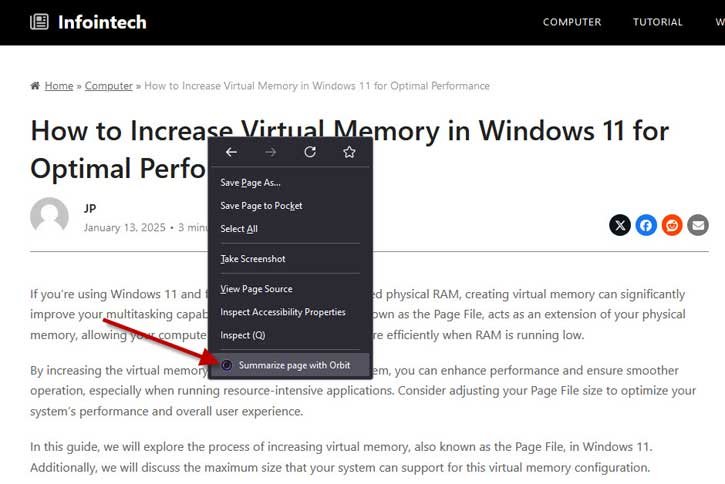
4. Right-click and select ‘Summarize page with Orbit.’
5. The summary will be displayed in the right sidebar of the browser.
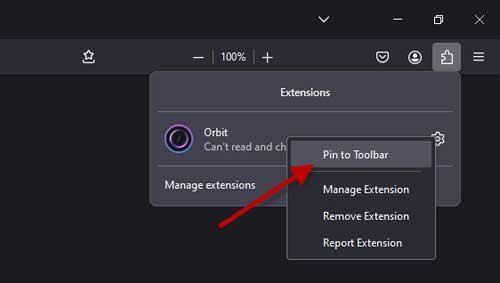
You can also easily access Orbit directly from your toolbar after pinning the extension. To pin the extension on Firefox’s toolbar, click the Extension icon on toolbar, right click Orbit extension and select Pin to Toolbar option.
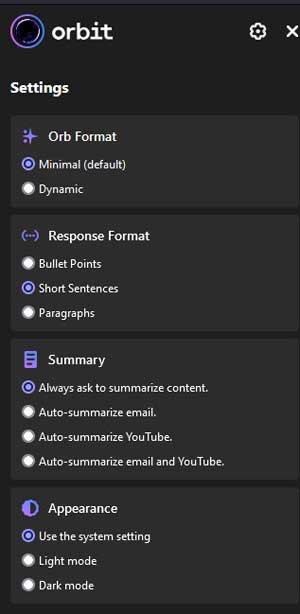
You can configure Orbit Ai assistant to customise the style of Orbit’s responses. Click the Settings cog, choose a response format (bullet points, short sentences or full paragraphs) , Orb format (dynamic or minimal), and summary type. Click the Snooze Orbit option to hide the AI assistant until you need it.
Features Offered by Firefox Orbit AI Assistant
Quick Summarization: Obtain summaries of emails, documents, articles, and video transcripts from popular platforms like Gmail, Google Docs, YouTube, and more.
Privacy-Focused: Orbit does not require you to create an account or store your session data. Your questions are only retained as long as necessary for processing.
User-Friendly: Designed to be simple and easy to navigate.
Interactive Q&A: Pose questions about the content on the page and quickly locate specific information.
Customizable Summaries: Select your preferred length and format for summaries.
Question Recommendations: Maximize your experience with Orbit through relevant question suggestions.
No AI Training on Your Data: Unlike other services, Orbit’s AI does not train on your data, ensuring your information remains confidential.
Conclusion:
As Orbit is still in its early stages of development, we observed that its summaries and responses tend to be slower and more basic in comparison to those generated by Microsoft’s Copilot, Brave’s Leo, and Opera’s Aria. However, the performance of Orbit improved significantly when utilizing its suggested prompts.

