

As 2026 approaches, millions of WhatsApp users are preparing to share their pre- and post-New Year celebration moments using the app’s Status feature. WhatsApp rolling out ‘Happy New Year 2026’ stickers pack, which you can add to your status update.
This guide explains how to add the festive ‘Happy New Year 2026’ sticker to your WhatsApp status, helping you spread holiday cheer and celebrate the upcoming year.
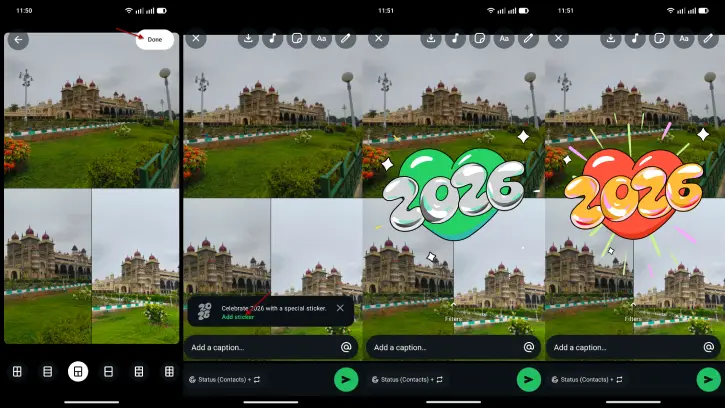
Currently, WhatsApp is rolling out new stickers to celebrate 2026 through its beta app version. If you have an Android smartphone, ensure you install WhatsApp version 2.26.1.4.
You can join the WhatsApp beta program on the Google Play Store to download the beta version. Alternatively, if joining through the Play Store is not possible, you can sideload the beta APK file. To do this, visit the APK Mirror website and download the beta APK for WhatsApp. If you prefer convenience, simply click this link to download the APK file directly to your device.
ALSO READ: How to Use WhatsApp’s Built-in Feature to Translate Messages
How to Add WhatsApp’s New ‘Happy New Year 2026’ Status Sticker
1. Open WhatsApp on your Android phone and tap the Updates tab at the bottom.
2. Tap Add Status (camera icon).
3. Select Layout (you’ll see a small “2026” animation over the Layout option).
4. Choose up to six images to include in the layout.
5. Pick your layout style and tap the white Done button.
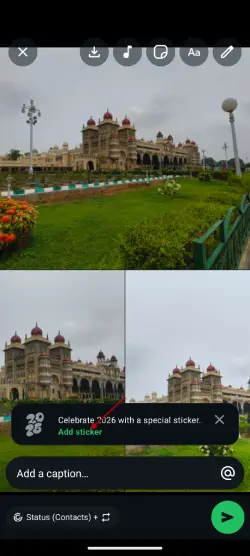
6. On the next screen, add a caption. When the “Celebrate 2026 with a special sticker” pop-up appears, tap Add Sticker.
7. A green sticker reading “2026” will be added to your layout.
8. To move or resize the sticker, pinch and drag it.
9. To change the sticker color, tap the sticker gently.
Alongside the new 2026 sticker for your WhatsApp Status, WhatsApp has launched a fresh Happy New Year sticker pack. This pack features 14 stickers, including one specifically for adding to your status, and it has a total size of approximately 488 KB. To access the sticker pack, open any chat and tap the Emoji icon located to the left of the text field.
Tap the stickers tab and then click the icon with the + symbol in the bottom right corner. Here, you can find all the new stickers released by WhatsApp under the “All Stickers” tab. In the “Your Stickers” tab, you’ll see all the sticker packs you’ve installed or downloaded from the Google Play Store.
Conclusion
As 2026 approaches, countless WhatsApp users are gearing up to share their pre- and post-New Year celebration experiences using the app’s Status feature. WhatsApp has launched a new ‘Happy New Year 2026’ sticker pack that users can add to their status updates, making it easier to spread festive cheer.

