

Most spreadsheet user use the Enter key to jump to new cell. You type a value into a cell, press Enter, and the cursor jumps to the next cell down. That default behavior is great when you’re filling a column, but it can slow you down if your workflow naturally moves across a row or column, and needs to move upward or sideways. Below are the shortcut keys to jump to new cell (down, up, left, right) in Excel and Calc.
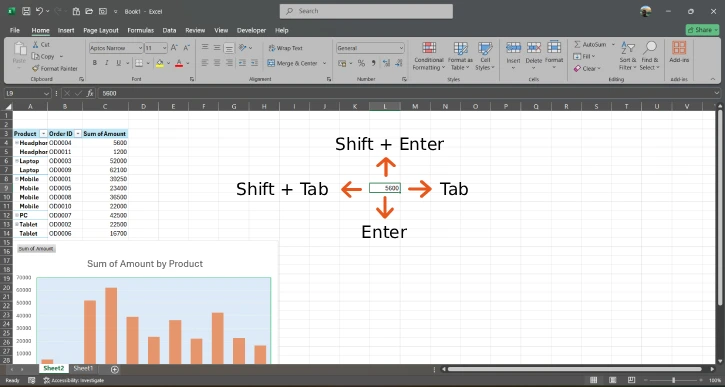
Shortcut to Jump to New Cell (Down, Up, Left, Right)
- Enter: Moves the cursor down one cell (to the cell directly below).
- Tab: Moves the cursor to the right one cell.
- Shift + Tab: Moves the cursor to the left one cell.
- Shift + Enter: Moves the cursor up one cell.
WhereThese Shortcut Keys Helps You in Work?
Creating a table or form: Often you fill fields left to right. Pressing Tab lets you move across the row without stopping.
Logging repeated entries: If you’re recording items in a column (like dates, product IDs, or values), Enter keeps you moving downward quickly.
Correcting mistakes: When you notice you typed something in the wrong cell, using Shift + Tab or Shift + Enter can pull you back to the previous location instantly.
Reviewing totals and inputs: Moving up with Shift + Enter can be useful when you’re cross-checking a series without breaking your pace.
ALSO READ: How to Use SORTBY Function in Excel to Sort Data in Ascending/Descending Order
FYI, before using these shortcut keys, decide whether you’re moving vertically or horizontally based on how your data is structured.
- If your template is column-driven, use Enter.
- If your template is row-driven, use Tab.
- If you’re working backward (reviewing or fixing), use Shift + Tab or Shift + Enter.
Final Thought
Excel and LibreOffice Calc both reward keyboard discipline. Instead of settling for only Enter (downward movement), take advantage of Tab, Shift + Tab, and Shift + Enter to move right, left, or up exactly when you need to. In the long run, these small improvements compound into real time savings—especially for repetitive data entry.

