

WhatsApp allows you to send messages to unsaved numbers. This is an useful feature for WhatsApp users, as it can come in handy in various situations. For example, when you want to share your location with a delivery person or if you need to provide information about a product or service to a potential client.
In this guide, let us learn how to send messages to unsaved numbers or non-contacts on WhatsApp. This method does not require any tricks, and it is also a time-saving process compared to the method we used before. WhatsApp officially allows you to send messages or chat with unsaved phone numbers.
How to Chat on WhatsApp Without Saving Phone Number?
1. First, copy or note down the phone number you want to message on WhatsApp.
2. Next, open WhatsApp on your phone and tap the Chat icon to start a new chat.
3. In the ‘Search name or number’ search bar, enter the phone number you want to send the message.
4. If the number has a WhatsApp account, a Chat button will appear at the top.
5. Tap the ‘Chat’ button next to the phone number to send a message or share location.
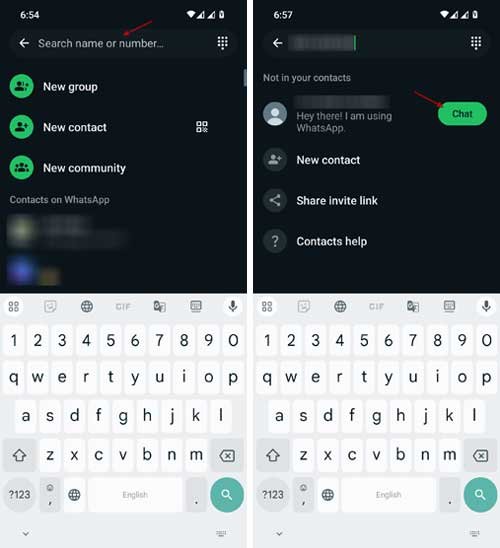
That is all how to send messages on WhatsApp to unsaved numbers or non-contacts. When you search for the number, you’ll also get options like saving it to your contacts from WhatsApp or sharing an invite link.
FYI, WhatsApp recently introduced several new features to enhance the user experience. Meta AI on WhatsApp, message translation, improved voice and video calling, status reactions, disappearing messages, View Once, multi-device supports, improved group chat, etc., are some of the new features of WhatsApp.

